
Download VoyagerAI – AI‑Powered Travel Planner for Unique Trips
Overview: Why VoyagerAI Is Changing the Way Adventurers Plan Their Journeys
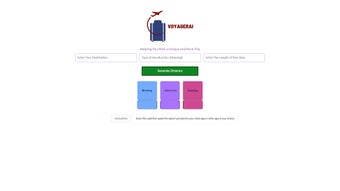
VoyagerAI is a web‑based, AI‑driven travel planning tool that focuses on delivering truly personalized itineraries for explorers who crave off‑the‑beaten‑path experiences. Unlike generic travel apps that push popular attractions, VoyagerAI analyzes millions of data points—ranging from local events and hidden cafés to sunrise hiking trails—to suggest activities that match a user’s preferences, location, and even the time of day. The platform’s standout feature is its QR‑code scanning capability: travelers can simply scan a code with their phone, answer a few preference prompts, and instantly receive a custom itinerary that can be copied into any notes application for offline reference.
The service is built with privacy at its core. No personal data is stored on the servers, meaning users can plan their trips with confidence that their information remains secure and free from third‑party tracking. While VoyagerAI does not provide real‑time flight or hotel updates, nor does it include an in‑app booking engine, it excels as a free, secure, and constantly updated source of inspiration for unique trips. Whether you are a weekend wanderer looking for a quirky museum in a small town or a seasoned globetrotter hunting rare cultural festivals, VoyagerAI offers a fresh perspective that turns ordinary vacations into memorable adventures.
For travelers who value authenticity over convenience, VoyagerAI’s AI algorithm acts as a digital travel companion that learns from each interaction, progressively refining its suggestions. The result is a travel plan that feels handcrafted, yet is generated in seconds—making the dream of discovering hidden gems both accessible and realistic. In the following sections we’ll explore the core features, walk through the installation process, discuss platform compatibility, and weigh the pros and cons so you can decide whether VoyagerAI deserves a spot in your travel‑planning toolbox.
Key Features & How VoyagerAI Works
- AI‑Generated Itineraries: Utilizes a machine‑learning model trained on millions of travel data points to produce custom day‑by‑day plans.
- Time‑Sensitive Recommendations: Suggests activities based on the exact time of day, ensuring sunrise hikes, night‑market visits, and sunset photo spots are perfectly timed.
- QR Code Preference Input: Scan a QR code to quickly input preferences—budget, activity type, mobility constraints—without typing long forms.
- Privacy‑First Architecture: No personal data is stored or shared, offering a secure planning environment.
- Cross‑Platform Notes Integration: Export itineraries to any notes app (Google Keep, Apple Notes, Evernote) for offline access.
- Off‑The‑Beaten‑Path Discovery: Highlights lesser‑known attractions, local festivals, and hidden eateries that mainstream guides often overlook.
- Free & Web‑Based Access: No download required; works on any modern browser, making it instantly available on Windows, macOS, Android, and iOS devices.
How the AI Generates a Unique Trip
When a user scans the QR code, VoyagerAI captures a concise set of preferences—such as preferred activity intensity, interest categories (culture, nature, food), and travel dates. This data is fed into the AI engine, which cross‑references it with a dynamic database of destination metadata, crowd‑sourced reviews, and real‑time event calendars. The algorithm then ranks potential activities based on relevance, uniqueness, and temporal suitability. For example, if a traveler prefers “early‑morning nature walks” and selects a coastal town in early spring, VoyagerAI will prioritize tide‑dependent beach walks, sunrise lighthouse tours, and local farmer’s markets that open at 7 am.
Because the platform does not rely on user accounts, the entire process stays anonymous. The resulting itinerary is displayed as a clean, copy‑ready list that includes location names, brief descriptions, optimal visit times, and optional QR‑linked maps. Users can edit the list manually before saving it to their preferred notes app, ensuring full control over the final plan.
Installation, Usage & Compatibility
Step‑by‑Step Installation (Zero‑Download Required)
VoyagerAI is a web‑based app, so there is no traditional installation process. Follow these simple steps to get started:
- Open your preferred browser (Chrome, Firefox, Safari, Edge) on any device.
- Navigate to the official VoyagerAI URL: https://voyagerai.com.
- Click the “Start Planning” button to generate a unique QR code on the screen.
- Using your phone’s camera or a QR‑scanner app, scan the code. A short preference form will appear.
- Select your travel interests, budget range, mobility preferences, and travel dates.
- Press “Generate Itinerary.” The AI will process your inputs and present a customized plan within seconds.
- Copy the itinerary text and paste it into any notes application, or click the “Export to Google Keep” shortcut for instant saving.
Device Compatibility (Operating Systems)
VoyagerAI works seamlessly across all major operating systems because it runs entirely in the browser. The following platforms are fully supported:
- Windows 10/11: Chrome, Edge, Firefox, and Safari (via Windows Subsystem for Linux) provide full functionality.
- macOS Monterey and later: Safari, Chrome, and Firefox render the interface without lag.
- Android 9+: Any modern mobile browser (Chrome, Firefox, Samsung Internet) can scan the QR code and display the preference form.
- iOS 14+: Safari and Chrome on iPhone/iPad support QR scanning natively, making the experience smooth and secure.
The web‑based nature also means that updates are automatic; there is no need to manually download patches or install new versions. As soon as the VoyagerAI team rolls out an improvement, every user instantly receives the latest AI models and UI enhancements the next time they load the page.
Pros & Cons, Frequently Asked Questions
Pros
- Completely free to use with no hidden fees.
- Privacy‑first design; no personal data is stored.
- AI delivers hyper‑personalized, time‑specific activity suggestions.
- QR code input makes preference entry fast and intuitive.
- Works on any device—no download or installation required.
- Exportable to any notes app for offline access.
Cons
- Lacks real‑time flight, hotel, or transport booking integration.
- No live updates for weather or venue changes.
- Relies on internet connection for AI processing.
- Limited to text‑based itineraries; no interactive maps within the app.
FAQ – VoyagerAI
Is VoyagerAI really free or are there hidden costs?
VoyagerAI is completely free. The service is ad‑supported, but there are no subscription fees, in‑app purchases, or hidden charges for generating itineraries.
Can I use VoyagerAI on a mobile device without a computer?
Yes. Since VoyagerAI runs in a web browser, you can open it directly on Android or iOS devices. The built‑in QR scanner on most smartphones makes the preference entry process just as smooth as on a desktop.
How does VoyagerAI protect my privacy?
The platform does not create user accounts or store personal identifiers. All preference data is processed anonymously and discarded after the itinerary is generated, ensuring a secure and privacy‑friendly experience.
What if I need real‑time updates on weather or venue closures?
VoyagerAI focuses on planning, not live monitoring. For real‑time information you’ll need to consult dedicated weather apps or check venue websites after you’ve received your itinerary.
Can I export the itinerary to Google Maps or another navigation app?
The generated list includes location names that you can copy into Google Maps manually. While VoyagerAI does not directly push the itinerary to navigation apps, the copy‑ready format makes it easy to transfer the data.
Conclusion & Call to Action
VoyagerAI fills a niche that many mainstream travel planners overlook: the desire for truly unique, time‑aware, and privacy‑focused trip ideas. Its AI engine, QR‑code preference entry, and cross‑platform accessibility combine to create a smooth, free, and secure experience for adventurous travelers. While the absence of live booking and weather updates may steer power users toward more comprehensive platforms, the core value of VoyagerAI—delivering off‑the‑beaten‑path itineraries in seconds—remains compelling.
If you’re ready to break free from cookie‑cutter vacation plans and explore hidden gems tailored to your exact schedule, download VoyagerAI now (simply open the website) and start crafting your next unforgettable adventure.
Overall Rating: 4.5 / 5



.png)



